The tale
This was a whole adventure that ended up being thrown the fuck out 2 hours later.
Client had changed primary emails after retiring, they still wanted to their old business emails as aliases with the ability to send from them. But wanted to have an automatic reply set for the aliases only.
	They also wanted nice formatting because they thought the automated shit from ExhchangeOnline looked bad

	They were right tbh
The first solution was implemented by my boss via aforementioned mail flow rule. This is how we learned of their distaste of plain text but there was also a minor issue with the methodology of his rule.
Below is a recreation of his rule. See if you can spot the cockup
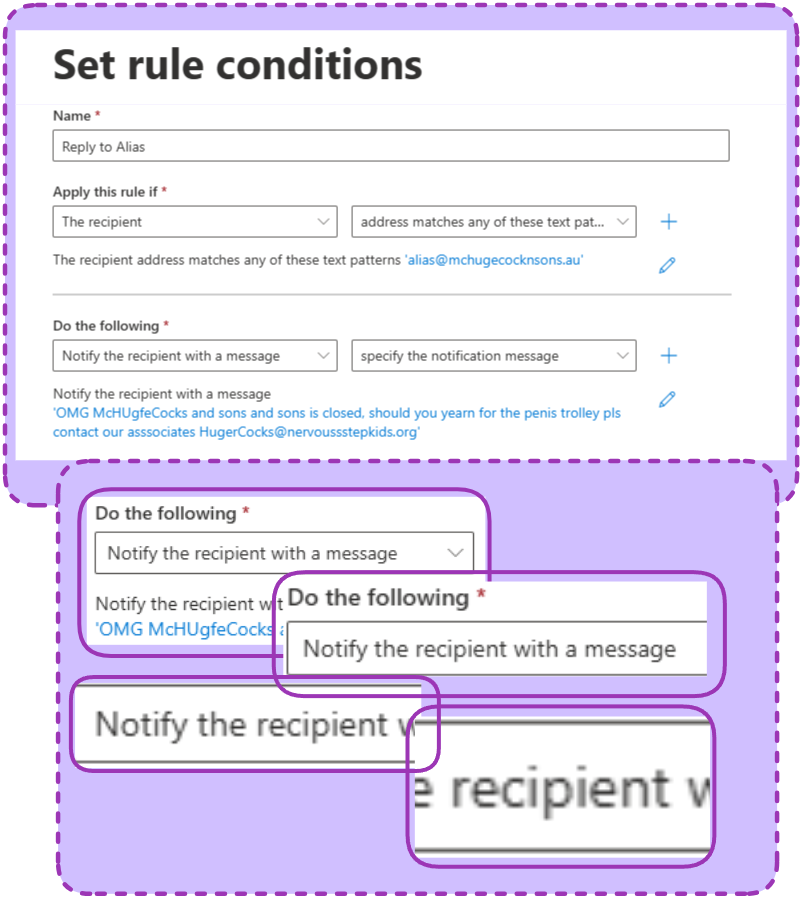
It was sending the autoreplies to the client not the people emailing
It sounds like I’m throwing shade but I did piss off a client realll bad by being two hours late to an onsite because I was doing the PowerAutomate she below and it was still awful. Maybe it’s just a company thing.
The solution I went with was very dumb and very functional
- Make a shared mailbox and give it the old alias
- Set the auto reply on the shared mailbox in the OWA, all the formatting you want
- Turn on mail forwarding to the original mailbox
- Set the forwarding to leave a copy with the shared mailbox so it triggers the auto reply
- Give the primary mailbox send as permissions to the shared
Done and Done, like 5 clicks, didn’t even need Claude.
If you’re worried about the shared mailbox filling up just make a retention policy that yeets stuff after a month or something (Guide here, sorta).
These were retirees telling their old clients to leave them alone, they’ll be dead before that shared mailbox fills up.
Here’s Claude’s notes on the adventure
Use case
Send an automatic reply to emails addressed to a specific alias on a mailbox, without using mail flow rules.
Why not mail flow rules?
The reply message option was removed from modern EAC. Mail flow rules can redirect or forward but can’t send a formatted HTML auto-reply anymore.
Why not Outlook auto-replies?
Outlook’s built-in auto-reply applies to the whole mailbox, not individual aliases.
Why not a shared mailbox?
Works if the alias can be moved to its own mailbox. If the client wants the alias to stay on their existing mailbox, Power Automate is the answer.
Flow structure
Trigger — When a new email arrives (V3)
- Connected to the primary mailbox (e.g.
[email protected]) - Leave To/CC/ToOrCC filters blank — filtering happens in the condition
Important: The trigger must be connected to the primary address, not the alias. Power Automate resolves aliases to the primary and filter fields won’t match alias addresses.
Condition 1 — Was the email sent to the alias?
@contains(triggerOutputs()?['body/toRecipients'], '[email protected]')
- True → proceed
- False → do nothing
Condition 2 (nested in True branch) — Is it a real email, not an auto-reply?
not(startsWith(triggerOutputs()?['body/subject'], 'Automatic reply'))
- Returns
truewhen the subject does NOT start with “Automatic reply” - No need to compare to
true— thenot()expression evaluates to a boolean directly - True → send the reply
- False → do nothing
Note:
isAutomaticReplyis not available as a property in the V3 trigger. Subject-based check is the reliable alternative.
Action — Send an email (V2)
- To:
@triggerOutputs()?['body/from'] - Subject:
Automatic Reply - Body: HTML formatted reply (paste in code view, not the visual editor)
HTML template
<div style="font-family: Arial, sans-serif; font-size: 14px;">
  <p>Dear valued clients,</p>
  <p>Your message here.</p>
  <p>Warm regards</p>
  <p>Name</p>
</div>
Always paste HTML in Code view — the visual editor will strip or mangle formatting.
Gotchas
- Trigger must be owned by and connected to an account that has access to the mailbox
- Alias filtering must be done in a condition, not the trigger filter fields
isAutomaticReplyproperty does not exist on the V3 trigger — use subject startsWith check insteadnot()returns a boolean — don’t addis equal to true, it’s redundant