The goal
A long, thin bar-style info monitor to sit in the gap under the existing 27” main display (not a second full-size monitor) — for chat apps etc. Preferably as wide as the 27” as possible, highest resolution available, touch is nice-to-have not required. Must work over USB only — nothing free on the 4080.
Confirmed use case: mostly reference windows (e.g. 3CX phone client) that still need to be interacted with — not passive glance-only widgets. Touch on the XENEON EDGE is a genuine plus here since it’s a real Windows display, not just a gauge screen.
The Result
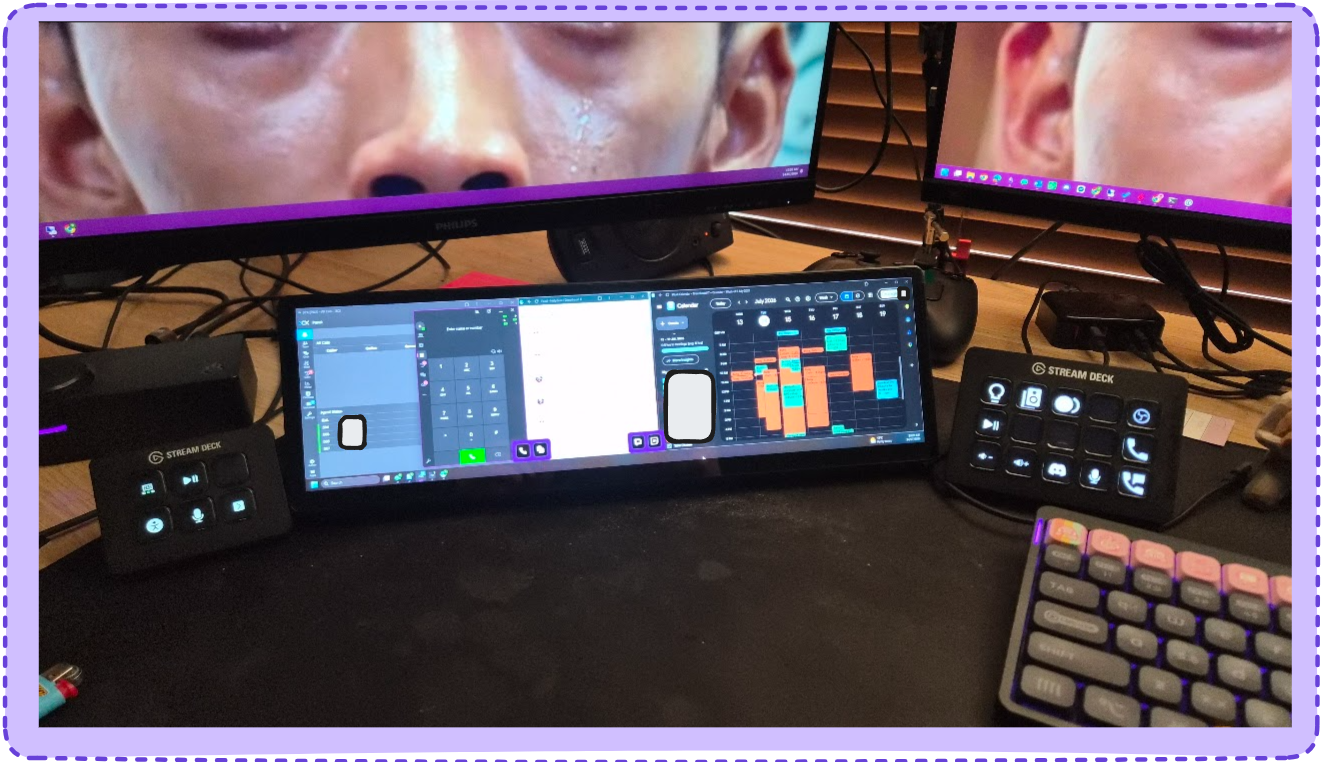
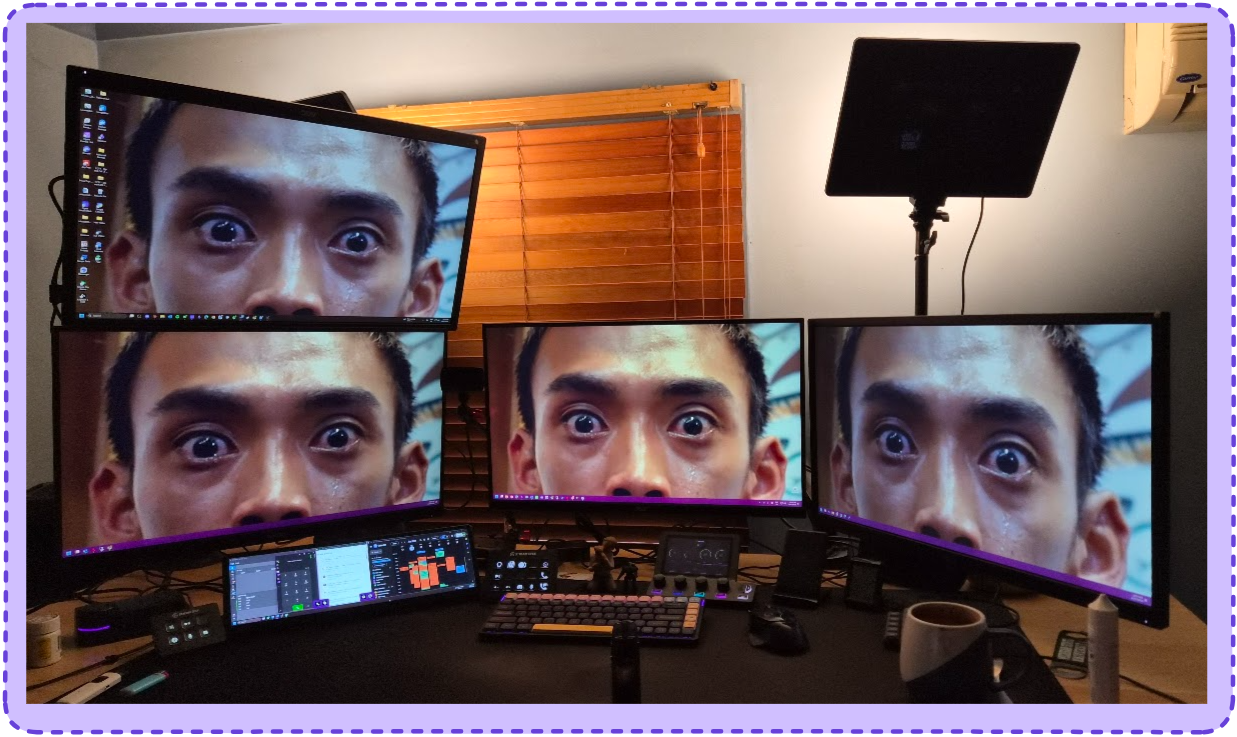
I got a Xeneon edge, even I thought it was kind of pointless but it’s actually sick. I haven’t got the Displaylink thing yet so it’s on the stream PC.
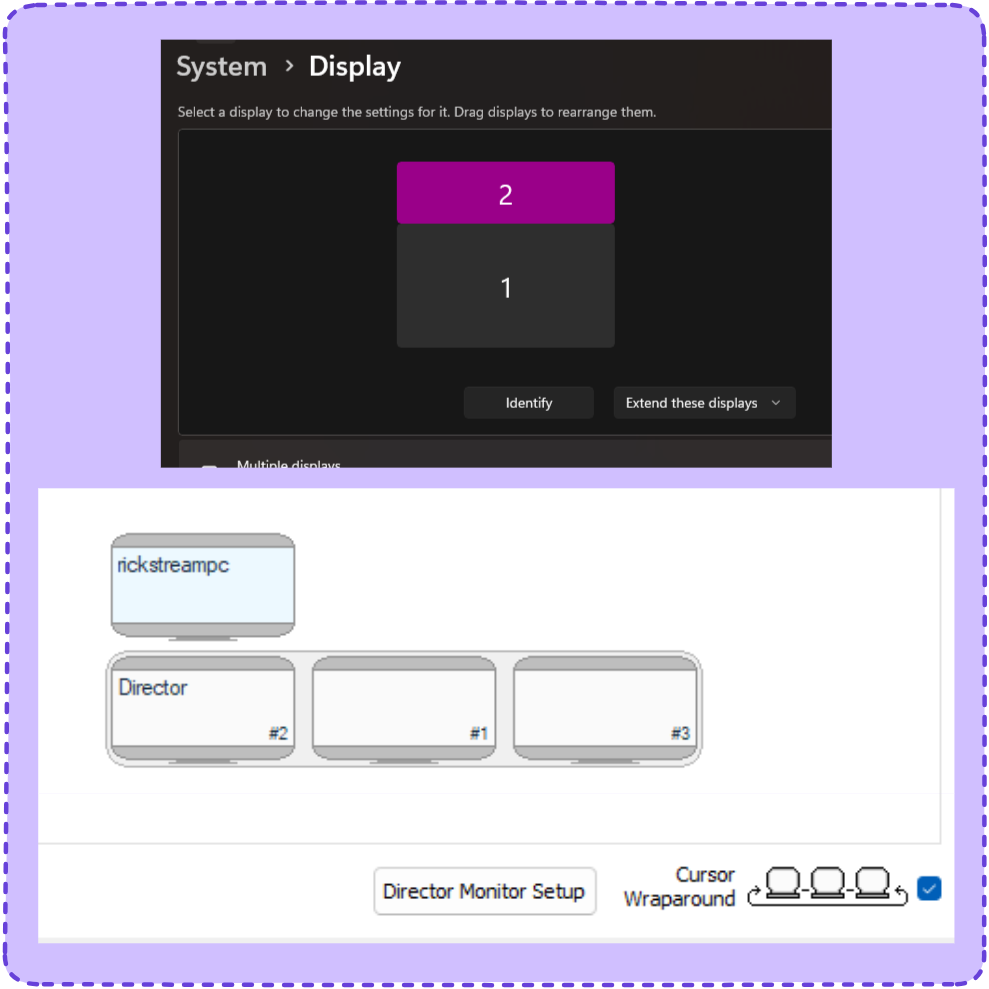
I use input director to control multiple PCs because Mouse Without Borders couldn’t work with my layout. I though have one stream PC monitor above and one below wouldn’t work. Turns out if you put the Xeneon above the main stream PC monitor in it’s display setting and then turn on wrap around mouse it works perfectly, you can move the mouse down from the main PC’s display and it goes onto the ‘top’ of the other PC.
There’s an expected benefit to having it on a separate PC, if I use the touch to interact with the apps on the Xeneon it doesn’t steal mouse focus from whatever I’m doing on the main PC.
Claude stuff below.
Important catch: “USB-C” doesn’t mean what I assumed
The RTX 4080 (Founders Edition and basically all AIB cards) has no USB-C port at all — Nvidia dropped VirtualLink after the 20/30-series. So a “USB-C monitor” won’t magically plug into the GPU — it still needs either:
- A free DisplayPort or HDMI port on the 4080 itself, or
- A USB-C port on the motherboard that’s wired to the CPU’s integrated graphics (only relevant if the CPU has an iGPU and it’s enabled) — this would also mean any monitor (not just USB-C ones) could go here via the board’s own HDMI/DP output, freeing up the GPU entirely, or
- A DisplayLink-based display — these use a spare USB-A/USB-C data port and render the image in software (GPU-agnostic, no physical GPU video output needed at all). This is the only option that truly doesn’t care that the 4080 is out of ports. Downside: DisplayLink adds latency/compression and struggles at high refresh rates, fine for chat apps though.
Worth checking which ports are actually free/used before buying — it changes which of the options below are viable.
Reality check on the bar-monitor category
There’s no bar/stretched-format monitor that gets anywhere close to 27” wide — this is a niche product category (aftermarket PC-building/stats displays) and the widest models top out around 14–15”, roughly half the width of the 27”. None of them are true single-cable “USB-only” displays either — they all need a video input (HDMI or DP-Alt) plus separate USB-C for power. So the plan is the same pattern as before: feed the bar monitor’s HDMI input from a USB DisplayLink adapter on a spare USB-A port, and power it independently (wall charger or a USB port used for power only).
Corsair XENEON EDGE 14.5” — best-built option, matches what you already liked
- 2560×720, IPS, touchscreen, widest and most polished of the bar-monitor options.
- Always needs USB-C for power (Corsair doesn’t specify wattage, but it’s independent of whether that USB-C carries video) — can be powered from a simple wall charger/power bank, doesn’t have to come from the PC.
- Separately has a physical HDMI input for video (that’s what the included DP-to-HDMI adapter cable is for when going PC → GPU). Feed that HDMI input instead from a Plugable UGA-4KHDMI USB 3.0→HDMI adapter (DisplayLink DL-5500, ~US$80) plugged into a spare USB-A port on the motherboard — the adapter easily handles 2560×720, well under its 2560×1440@60Hz ceiling.
- Net result: only touches a spare USB-A port (for the DisplayLink adapter) + a USB-C power source (wall charger, or another spare USB port used purely for power) — nothing on the 4080.
- Can be released from iCUE to run as a normal Windows display rather than just widgets.
- This is the pick — matches the “long thin info screen for chat apps” brief and the look you already liked.
Cheaper alternatives (LESOWN / Prechen bar monitors)
- LESOWN tops out around 12.7”–14.1” (e.g. P127GHTR 2880×864, or the 14.1” 1920×550) — narrower and lower-res than the XENEON EDGE, no touch on most models, but a fraction of the price (~US$60–120 vs Corsair’s premium).
- Same connection pattern applies: HDMI input + separate power, so same DisplayLink-adapter trick works.
- Build quality/panel quality is a step down from Corsair — worth it only if budget is the deciding factor.
Recommendation
- Corsair XENEON EDGE 14.5” + a DisplayLink USB adapter on a spare USB-A port, powered via wall charger/power bank. Best panel/touch/build in the bar-monitor category, solves the “nothing free on 4080” problem entirely through USB.
- If budget matters more than quality/touch, a LESOWN bar monitor (12.7”–14.1”) with the same adapter trick is the cheaper fallback.
- Nothing in this category reaches close to 27” wide — that’s a hard limit of the product category, not something solvable by picking a different model.
Adapter chosen: Plugable USBA2DPGB (~$50 AUD)
- DisplayLink DL-6950 chipset, dual Dual-Mode DisplayPort (DP++) outputs + Gigabit Ethernet. Cheaper than the HDMI-only DL-5500 option (~$80) originally suggested.
- Xeneon Edge only has a physical HDMI input (no native DP port — its only DP is via USB-C Alt Mode), so needs a passive DP-to-HDMI adapter/cable (~$10–15) in between — cheap because the output is DP++ (dual-mode), not plain DP.
- Total: ~$60–65 all-in, plus a spare second DP port and Ethernet as a bonus.
- Confirmed use case: mostly the 3CX phone client + reference windows, needs to stay interactive (touch helps here).
Outcome — bought and set up
- Went with the XENEON EDGE. Ended up running it on the stream PC via native HDMI + USB-C for power/touch (not the DisplayLink adapter plan above — that PC had a free port).
- Hit a sleep/wake loop: screen sleep → USB disconnect/reconnect sounds → screen wake, repeating. Root cause was the “Corsair composite virtual input device” (and the neighbouring “HID-compliant consumer control device”) under Human Interface Devices in Device Manager having “Allow this device to wake the computer” ticked — the monitor’s own USB power cycling on sleep was triggering a false wake. Fixed by unticking wake permission on those two entries (confirmed via
powercfg /devicequery wake_armedthat only keyboard/mouse/NIC remained armed). - Wanted the Freshdesk “Recent Activity” flyout as its own window for the bar screen — turned out Freshdesk has no dedicated URL for that panel (long-standing feature request, still open). Worked around it with something else in the end rather than building the API-based custom page.