Want people to know when you’re acting busy?
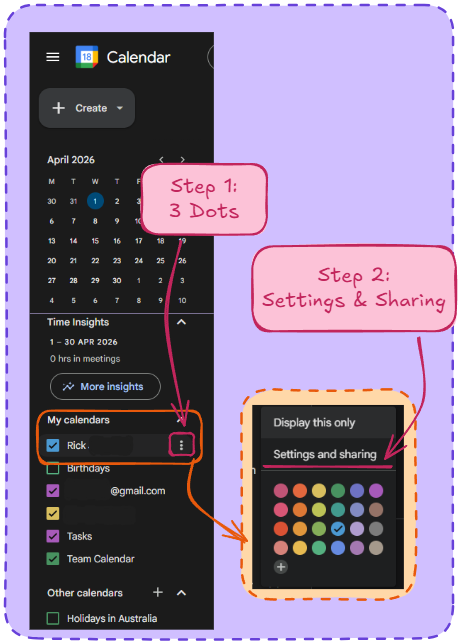
Step 1 & 2:
- Head to calendar.google.com
- Find your calendar on the list to the left
- Smash them 3 dots
- Hit ‘Settings and sharing’
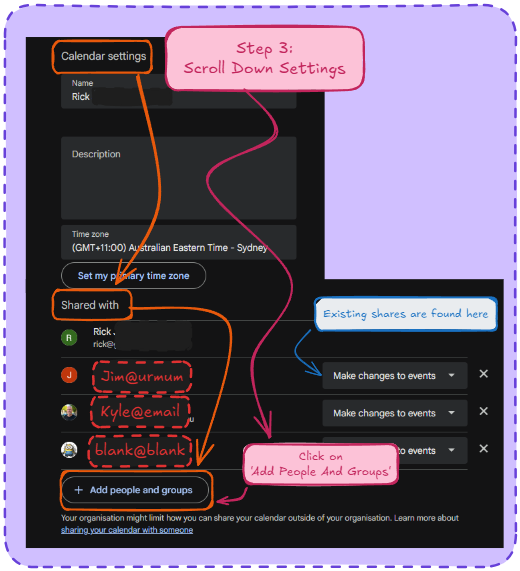
Step 3:
- You’re now in Calendar Settings
- Head down to ‘Shared With’
- Here you’ll see the previous times you did this and forgot. You can change settings if you want
- Hit ‘+Add people and groups’
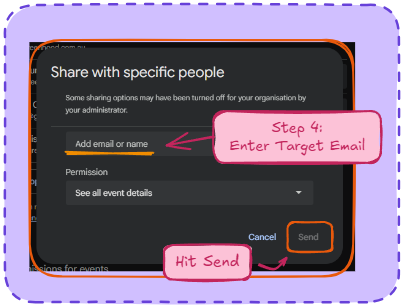
Step Final (4)
- Type in the name of the calendar receiver
- Click on send.
- Done and done